Things2.8.8
Publisher Description
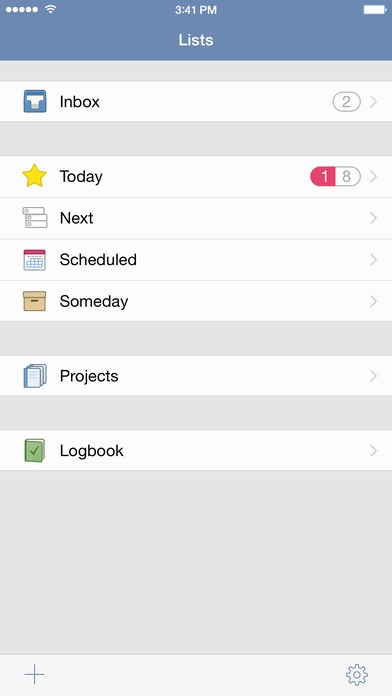
Things is a delightful and easy to use task manager. It s the perfect companion for everything you want to achieve in life, offering a great balance between ease of use and powerful features.
*** Updated for iOS 10 and watchOS 3 ***
Things sets itself apart in flexibility and ease. - O Reilly, Best iPhone Apps
Things definitely tops our list of GTD applications for the iPhone. - Cory Bohon, Mac|Life 5 stars
If Things sounds simple, that s because it is. Other to-do list managers I ve tried have, quite honestly, gotten in the way of me getting things done. Things doesn t do that. And I wouldn t have it any other way. - Macworld 4 stars
AWARDS
Macworld UK Award Best iPhone Business & Utility App - Winner
Mac|Life Editors Choice Award - Winner
Featured by Apple as Editor s Choice in more than 25 countries
Featured by Apple in New Year, New You
Featured by Apple in Get Stuff Done - Apps for Productive People
Featured by Apple in @work - Apps for Business
WORKFLOW
When you start using Things, you ll be surprised how easy it is to enter and manage your tasks. And with Things beautiful interface, task management becomes a delight. But all of this doesn t come at the expense of power everything you wish for in a task manager, Things has you covered.
Today: Decide which tasks you want to do today and put them into your Today list. Throughout the day, come back to this list to check items off. Things will automatically show you due and scheduled items there once their date arrives - so you won t miss anything important.
Focus: See what you need to do Today, what s coming up Next, and what s Scheduled for later. Put tasks in Someday if you can t work on them right now, you can always come back to them later.
Keep organized: Work, Family, Hobby - with Things, everything has its place. Projects and Areas of Responsibility let you master complex tasks and stay on top of your responsibilities in life and work.
Use Tags to assign contexts, priorities, time whatever fits your personal workflow. Quickly filter a list to find those tasks which are most relevant now.
Out of your head, into Things: Enter new ideas the moment they hit you. Adding to-dos is always just a tap away.
And much more: Create repeating tasks, add due dates, schedule tasks for a later date, review completed tasks in the Logbook, etc.
iOS FEATURES
Things for iPhone includes a new Quick Action for the app icon; a Today Widget in Notification Center for quick access to your to-dos; Handoff support for seamless transition between Mac, iPad, iPhone, and Apple Watch; an Add to Things extension for creating to-dos from other apps; a sharing extension for sending to-dos to other apps; and Push Sync with Background Refresh to keep to-dos up-to-date even while the app isn t running.
THINGS FOR APPLE WATCH
Things is now available for Apple Watch included for free with your purchase of Things for iPhone. Have all of your to-dos for the day easily accessible on your wrist, and mark them complete as you go; focus on specific projects; track your progress as you complete to-dos throughout the day; and enter new to-dos easily just by speaking to Siri. See the app in our new video! => http://things.watch
THINGS CLOUD
Your to-dos, on all your devices. Things Cloud is a free service that stores your to-dos and updates them quickly & effortlessly across your Mac, iPad, iPhone, and Apple Watch (Mac & iPad apps sold separately).
QUESTIONS?
We provide world-class, professional support for Things. If you have any issues or questions about the app, please contact us and we ll be glad to help you: http://things.support
Requires iOS 8.2 or later. Compatible with iPhone, iPad, and iPod touch.
About Things
The company that develops Things is Cultured Code GmbH & Co. KG. The latest version released by its developer is 2.8.8.
To install Things on your iOS device, just click the green Continue To App button above to start the installation process. The app is listed on our website since 2008-07-11 and was downloaded 17 times. We have already checked if the download link is safe, however for your own protection we recommend that you scan the downloaded app with your antivirus. Your antivirus may detect the Things as malware if the download link is broken.
How to install Things on your iOS device:
- Click on the Continue To App button on our website. This will redirect you to the App Store.
- Once the Things is shown in the iTunes listing of your iOS device, you can start its download and installation. Tap on the GET button to the right of the app to start downloading it.
- If you are not logged-in the iOS appstore app, you'll be prompted for your your Apple ID and/or password.
- After Things is downloaded, you'll see an INSTALL button to the right. Tap on it to start the actual installation of the iOS app.
- Once installation is finished you can tap on the OPEN button to start it. Its icon will also be added to your device home screen.
